Personalize Genie
Choose a vibe for your practice
Use the available mood choices to set the tone of a session.
Updated 2 November 2026 · 3 min read
Open this in Genie ↗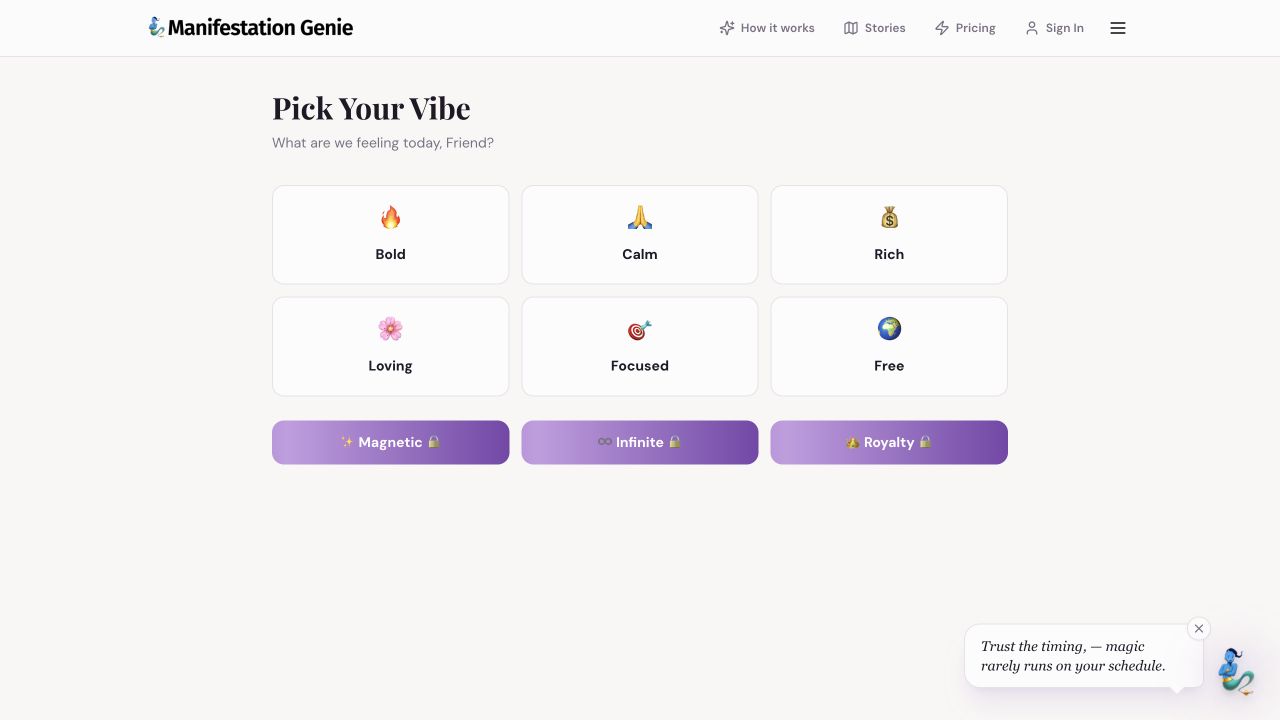
Step by step
- Open Pick Your Vibe and choose a word that matches how you want to approach today's practice.
- Start with an available choice such as Calm, Bold or Focused. Review any description or continuation control shown after choosing.
- Bring that intention into Chat: “I chose Calm. Help me make today's action feel manageable.”
- Revisit the Vibe page when a different tone would help. You do not need a locked choice to begin a useful conversation.
Why is a vibe locked?
A lock indicates an access requirement in the app. Read the current explanation before deciding whether to upgrade. Available choices and access can change.
A vibe is a starting point
It is not a promise that your mood or circumstances will instantly change. Tell Genie honestly how you feel and ask for a tone that supports you.
If the choice does not seem to carry over
Mention it explicitly in Chat, check that you are using the same browser, and contact support if the issue repeats.
Still need a hand?
Contact support with the page URL, what happened and any error text.
← Back to all tutorials