Journal & reflection
Write and revisit a Mirror Journal entry
Use the writing prompt, reveal a reading and find earlier reflections.
Updated 2 November 2026 · 3 min read
Open this in Genie ↗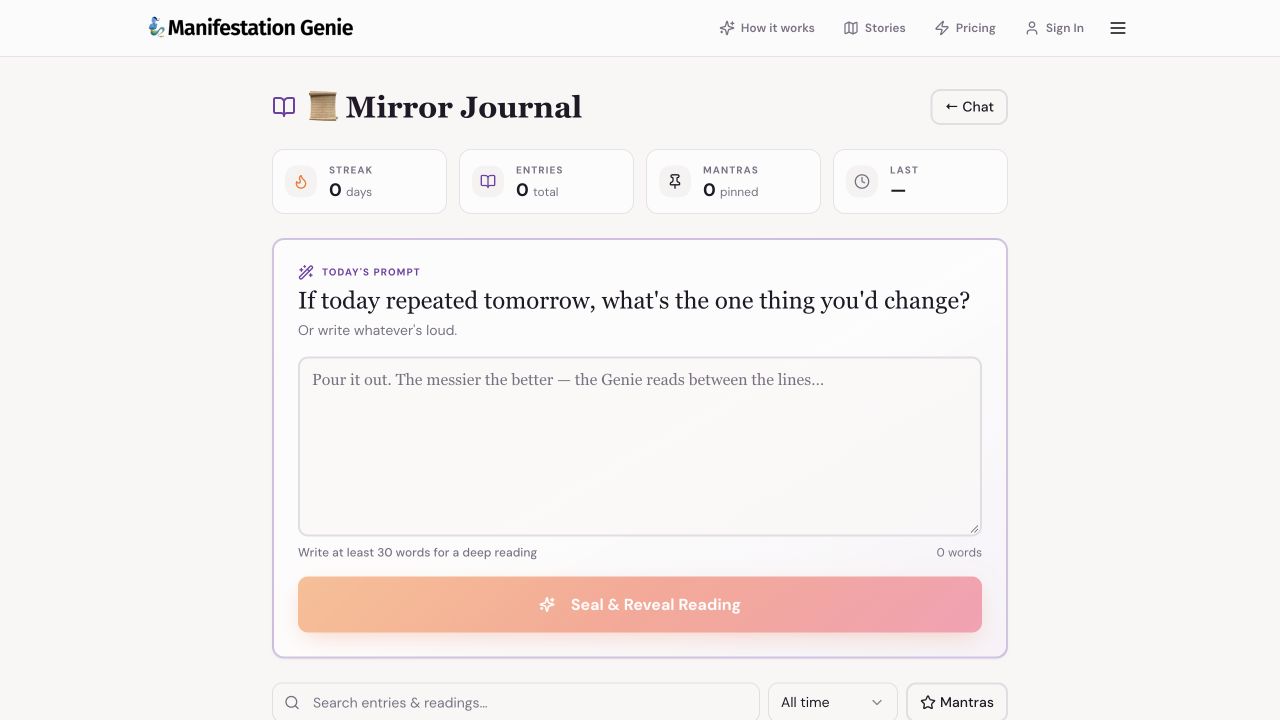
Step by step
- Open Mirror Journal. Use Today's Prompt or write about what is on your mind.
- Write at least 30 words, as requested by the live writing screen. Include a real moment, the feeling it brought up and what you want to understand.
- Choose Seal & Reveal Reading when it becomes available. Stay on the page while the request completes, and follow any access prompt shown.
- Read the returned reflection and choose one small action. Save a mantra if that control is offered in your reading.
- To return to an entry, use Search entries & readings, the date filter or Mantras. Clear the filters if an entry appears to be missing.
What a reading can include
The current app source describes mirror, metaphor, pattern, reframe, micro-action and mantra. Use them as reflection prompts, and reject interpretations that do not fit your experience.
The reading failed
Keep a copy of what you wrote before refreshing or leaving. Check your connection and account access, then try again when ready. If it repeats, send support the error text and time, without publishing the journal entry.
Protect your writing
The app uses browser storage for parts of its journal workflow. Do not assume every entry automatically syncs across devices. Keep a separate copy of anything important before clearing browser data or changing devices.
Still need a hand?
Contact support with the page URL, what happened and any error text.
← Back to all tutorials